
Articles ·
How to count down to birthdays, trips and anything you're waiting for on iPhone
How many days until the holiday, the wedding or the birthday, with a photo, a reminder and sharing with friends.
“How long to go?” For the holiday, your friend’s wedding, your child’s birthday. The iPhone Calendar knows the date, but it doesn’t tell you there are 23 days left, and it certainly doesn’t make it look good.
With Chronos: a countdown with a photo
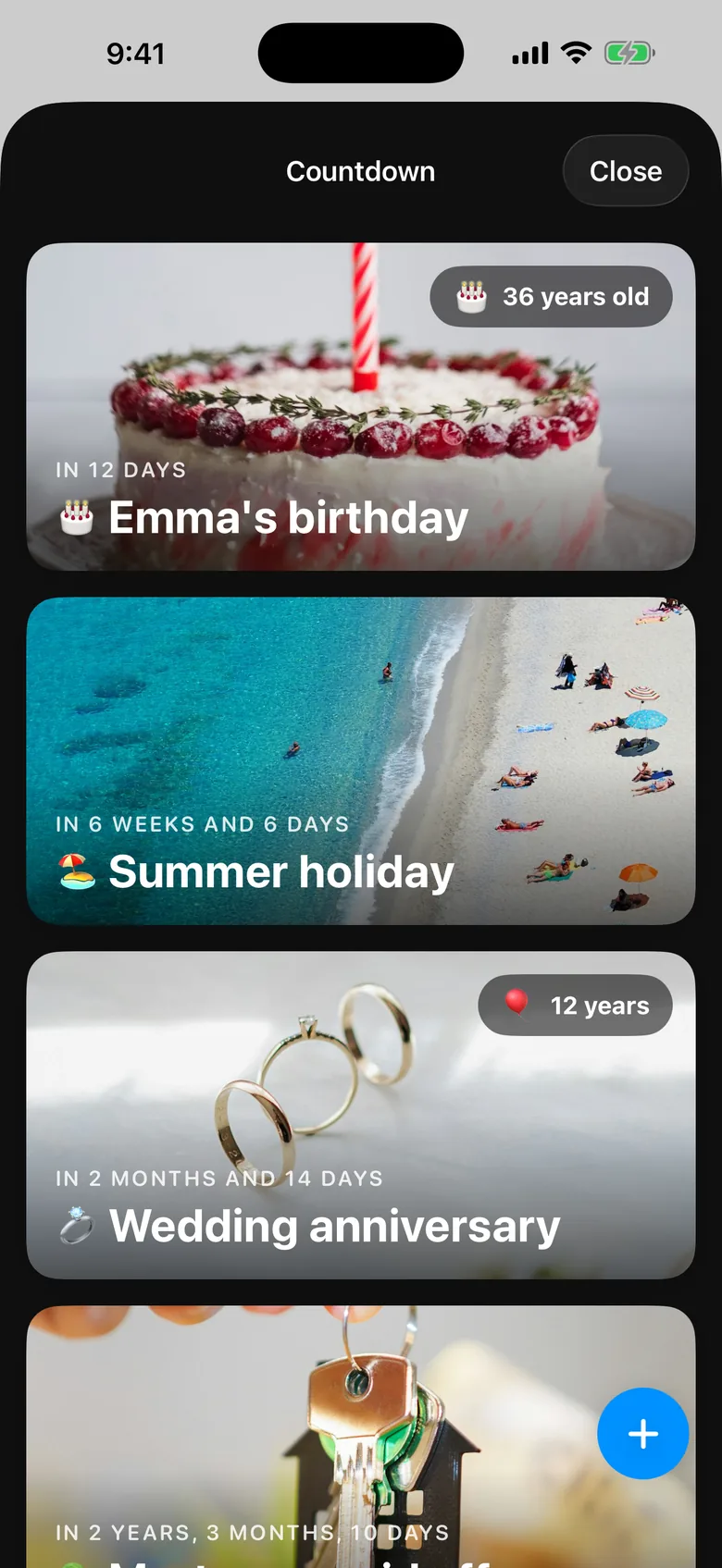
In Chronos, tap the ⏱ button at the bottom, or touch and hold the app icon and choose Countdown. Give it a name, a date and, if you like, a photo.
- Four formats: days only (“in 120 days”), weeks and days, months and days, or years, months and days.
- A notification as many days ahead as you want, from the same day to a month before.
- Every countdown also shows in your calendar, as an all-day entry on the day.
- For birthdays and anniversaries it also shows the age or the years (“🎂 40 years old”), and can repeat every year.
- With iCloud sync, you see it on iPhone, iPad and Mac.
Send it to a friend
Touch and hold the card and choose Share. Your friend gets the countdown via AirDrop, iMessage or email, and with one tap has it in Chronos too, with the same photo. Perfect for a trip you’re both looking forward to.
A small tip
For a trip, use a photo of the destination. Every time you open the app, it reminds you what’s coming.